

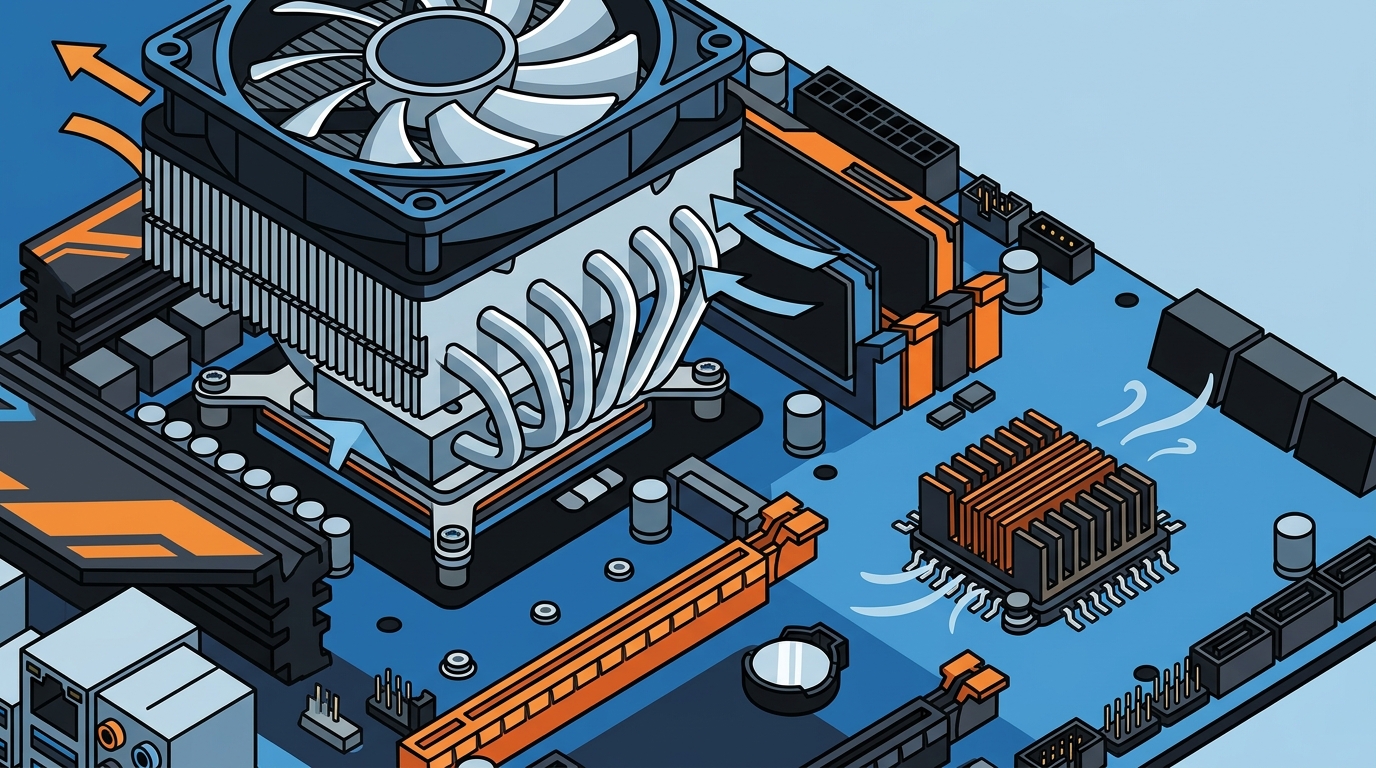
If you are building or upgrading a PC, you have probably noticed that your motherboard has more than one heatsink. One sits on the processor, and another often covers a smaller chip nearby. These are the CPU cooler and the chipset cooler, and despite looking similar, they serve very different purposes. Understanding these differences helps you choose the right cooling hardware, avoid overheating, and get the most out of every component in your system. Below, we break down exactly what sets them apart and when each one matters.
What Is a CPU Cooler?
A CPU cooler is a thermal management device that sits directly on top of your processor to transfer heat away from the chip and into the surrounding air or liquid. The heat generated by the processor is distributed to the metal lid of the CPU, called the Integrated Heat Spreader (IHS), and then transferred to the cooler's baseplate via thermal paste.
From the baseplate, heat moves through heat pipes or liquid tubing to fins or a radiator, where fans expel it from the case. CPU coolers must handle substantial thermal loads because modern desktop processors can output anywhere from 65 W to over 250 W of heat under load.
Why It Matters
Without adequate CPU cooling, your processor will thermally throttle, reducing clock speeds and hurting performance. In extreme cases, the system will shut down to prevent permanent damage. That is why choosing the right CPU cooler is one of the most important decisions in any PC build.
What Is a Chipset Cooler?
A chipset cooler is a smaller heatsink (sometimes with a tiny fan) mounted on the motherboard's chipset. A chipset is the controller hub on a motherboard that manages data flow between the CPU, RAM, storage, and expansion slots. Modern chipsets like AMD's X870 or Intel's Z790 generate modest heat, typically between 5 W and 15 W, so their coolers are far smaller than CPU coolers.
Most motherboards include a built-in chipset heatsink. On higher-end boards, you may see an aluminum or copper block integrated into the board's armor. The AMD X570 chipset was a notable exception, requiring an active fan because of its higher power draw from full PCIe 4.0 lane support.
Side-by-Side Comparison
| Feature | CPU Cooler | Chipset Cooler |
|---|---|---|
| Component Cooled | Central Processing Unit (CPU) | Motherboard chipset (e.g., B650, X870, Z790) |
| Typical TDP Range | 65 W – 250+ W | 5 W – 15 W |
| Common Form Factors | Tower, top-down, AIO liquid, custom loop | Passive heatsink, small active fan |
| Sold Separately? | Yes – often required purchase | Rarely – usually pre-installed on the motherboard |
| Installation | Mounting bracket, backplate, thermal paste | Pre-mounted or clipped onto the motherboard |
| Noise Contribution | Moderate to high (depends on fan speed) | Minimal to none |
| Price Range | $15 – $200+ | $5 – $20 (if purchased standalone) |
Thermal Demands and TDP
Thermal Design Power (TDP) is the maximum amount of heat a component generates under sustained workload, measured in watts. A modern desktop CPU like the AMD Ryzen 9 9950X has a TDP around 170 W, while a B650 chipset dissipates roughly 5 to 7 W. This enormous gap explains why CPU coolers are physically larger, use heat pipes, and often require dedicated fans or radiators.
Chipset coolers, by contrast, need only a small aluminum block to stay within safe operating temperatures. The exception was AMD's X570 chipset, which drew enough power that many motherboard manufacturers added a small active fan directly on the chipset heatsink.
Airflow Interaction
Tower-style CPU coolers direct air front-to-back, which may bypass the chipset area entirely. Some AIO liquid coolers address this by including a secondary VRM fan on the pump head to cool the socket area and nearby chipset. The Arctic Liquid Freezer III, for example, features a 60 mm PWM-controlled fan to cool the VRM zone when airflow from the CPU cooler is absent.
Types of CPU Coolers
Air Coolers
An air cooler is a heatsink-and-fan assembly that uses conductive metal and moving air to dissipate heat. Air coolers range from compact low-profile models for small-form-factor builds to massive dual-tower designs with six heat pipes. Budget-friendly options like the Arctic Alpine series start under $16, while premium towers can exceed $80.
AIO Liquid Coolers
An AIO (all-in-one) liquid cooler is a sealed loop that circulates coolant between a CPU-mounted water block and a radiator. AIO coolers typically offer better thermal performance than air coolers, especially with 280 mm or 360 mm radiators. They are ideal for high-end CPUs that you plan to overclock.
Custom Loop Cooling
Custom loops offer the ultimate flexibility, allowing you to cool the CPU, GPU, and even the chipset in a single loop. However, they are significantly more expensive and complex to build, making them best suited for experienced enthusiasts.
Do You Need a Separate Chipset Cooler?
In most cases, no. Modern motherboards ship with an adequate chipset heatsink pre-installed. Standalone chipset coolers, like the Dynatron V35G, are designed for replacement scenarios where the original heatsink has failed or when building a custom server that needs additional thermal headroom.
You might consider upgrading the chipset cooler if you notice the chipset running above 80 degrees Celsius consistently, or if your case has poor airflow and you are using a high-power chipset like the X570. Applying quality thermal paste during any cooler swap also helps maximize heat transfer.
Key Takeaways
- A CPU cooler handles the processor's high heat output (65 W to 250+ W), while a chipset cooler manages the motherboard chipset's modest thermal load (5 W to 15 W).
- CPU coolers are sold separately and come in air, AIO, and custom loop formats. Chipset coolers are almost always pre-installed on the motherboard.
- TDP is the critical specification that determines cooler size and complexity.
- Most builders never need to buy a standalone chipset cooler, but poor case airflow or high-power chipsets may warrant an upgrade.
- Proper thermal paste application improves heat transfer for both CPU and chipset coolers.
- Tower CPU coolers may reduce airflow over the chipset area; down-draft or AIO coolers can help compensate.
- Always verify socket compatibility (e.g., LGA 1700, AM5) before purchasing a CPU cooler.
Frequently Asked Questions
Can I use a CPU cooler on a chipset?
No. CPU coolers are far too large and use mounting systems designed for CPU sockets. Chipset heatsinks are secured with push-pins or screws specific to the motherboard layout.
Does every motherboard come with a chipset cooler?
Most mid-range and high-end motherboards include a pre-installed chipset heatsink. Some entry-level boards may use a bare passive heatsink without decorative shrouding, but cooling is still provided.
What happens if a chipset overheats?
An overheating chipset can cause USB ports, SATA drives, and PCIe devices to disconnect or behave erratically. In severe cases, the system may freeze or reboot.
Do I need thermal paste for a chipset cooler?
Yes. A thin layer of thermal paste or a pre-applied thermal pad is needed between the chipset die and the heatsink to ensure efficient heat transfer.
Is an AIO cooler better than an air cooler for the CPU?
AIO coolers generally offer superior thermal performance and quieter operation for high-TDP processors. Air coolers are more affordable, simpler to install, and have no risk of coolant leaks, making them a solid choice for most builds.
Why did AMD X570 motherboards have a chipset fan?
The X570 chipset supported full PCIe 4.0 connectivity across all lanes, which increased its power consumption significantly. A small active fan was added to many X570 boards to keep the chipset within safe temperatures.
Where can I buy CPU coolers and chipset coolers online?
AAAwave carries a wide selection of CPU coolers, AIO liquid coolers, and chipset cooling accessories from brands like Arctic, Dynatron, and Corsair, all with fast US shipping.
Find the Right Cooler for Your Build
Whether you need a high-performance AIO for an overclocked Ryzen processor or a compact air cooler for a budget workstation, AAAwave has the cooling solution for you. Browse CPU coolers at AAAwave and enjoy competitive pricing with fast shipping from our US warehouse.